This panel shows the monetary amounts related to costs, billing, expenses, and margins of the configured projects. This way, you can see the profitability of all your projects in real time.
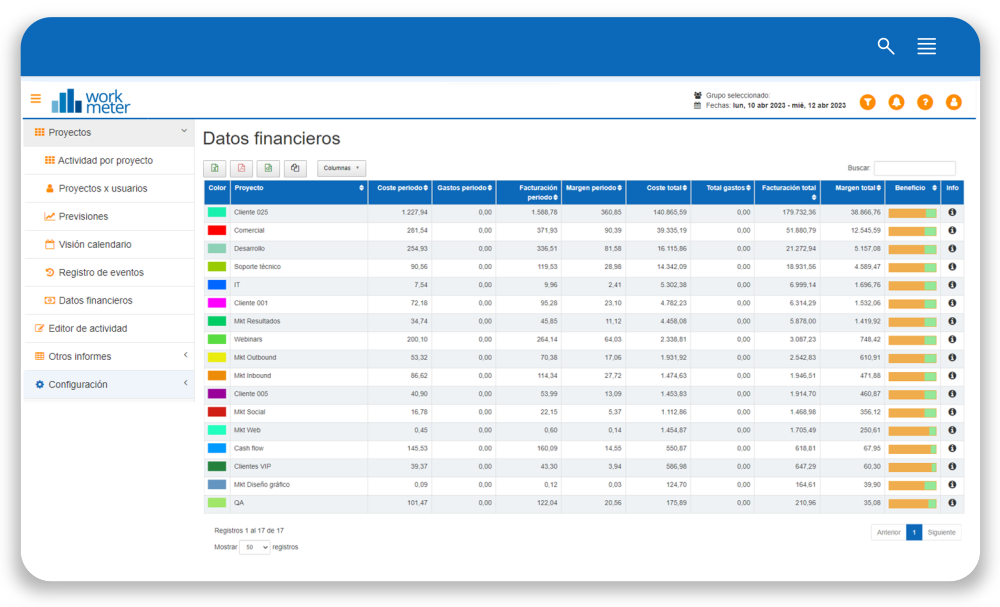
- 1. - Project: project name
- Period cost: monetary value or amount of money that each project costs you in the previously selected date range. It is calculated based on the hours of dedication each employee has worked on the project and the hourly cost you have previously configured for those employees. Check our getting started guide to learn how to configure the hourly cost of employees.
- Period billing: monetary value or amount of money obtained or billed for each project in the previously selected date range. It can be calculated in two different ways: with the price of billable hours of employees or projects. If both fields are filled, the project billable hour information will prevail over that of the employees. See how to configure projects or how to configure employee options.
- Period margin: profit obtained for each project in the previously selected date range. It is calculated by subtracting the cost amount from the billing amount.
- Total cost: monetary value or amount of money that each project costs you until its completion date
- Total expenses: this column shows all expenses entered through the Expense Notes added in Event Log. If an administrator or group manager does not approve these expenses as valid (when they exceed a certain amount that we will set ourselves in Settings > General options), they will not appear here.
- Total billing: monetary value or amount of money obtained or billed for each project until its completion date
- Total margin: profit obtained for each project until its completion date. It is calculated by subtracting the total cost amount from the total billing amount.
- Profit: visually represents the total cost (orange area) and the total margin (green area) of each project until its completion date.
- Offer price: is the value previously configured in the project settings (Settings > Projects > Configure project), referring to the price offered to the client.
- Price margin: The difference between the previously configured offer price and the total cost.