The productivity map is configured for each work group, since there will be applications that can be considered productive for one group and not for another (for example, generally in the Online Marketing group, Facebook or Twitter are productive while in Accounting or Sales they are unproductive).
To change the configuration of an application, just press the “switch” with green meaning productive and yellow meaning unproductive.
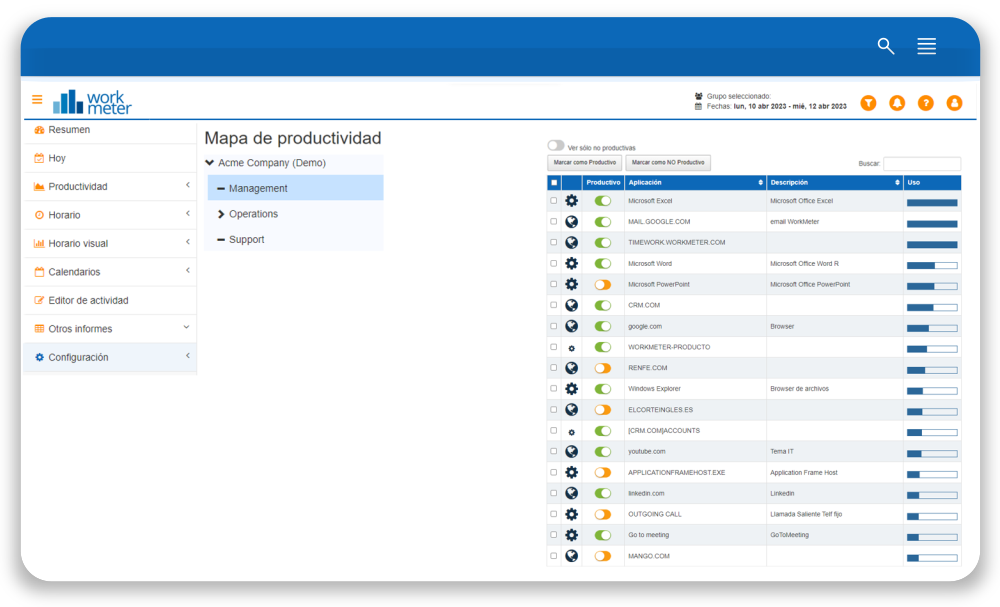
Applications that have not been configured will appear by default as unproductive. Use the search engine to find a specific application.
You can filter applications using the View only unconfigured option to filter those that have not been defined by your organization. It is recommended to configure them whenever their use is significant. Any changes made to the productivity map will be applied retroactively. Changes will be applied to previous data so that all information is homogeneous.