Active range 🔗
The active range time is calculated based on the detected start and end activity times (first and last event of the day). Generally, the first event of the day corresponds to turning on the PC + Login and the last event to turning off the PC.
Activity 🔗
“Activity” is the time spent interacting with the computer (online time) or away from it and manually reported through idle tracking (offline time).
Online activity 🔗
Activity time that occurs on the computer; that is, actual activity. Online activity data is collected automatically and almost in real time, allowing for a completely objective analysis.
Offline activity (away from the PC) 🔗
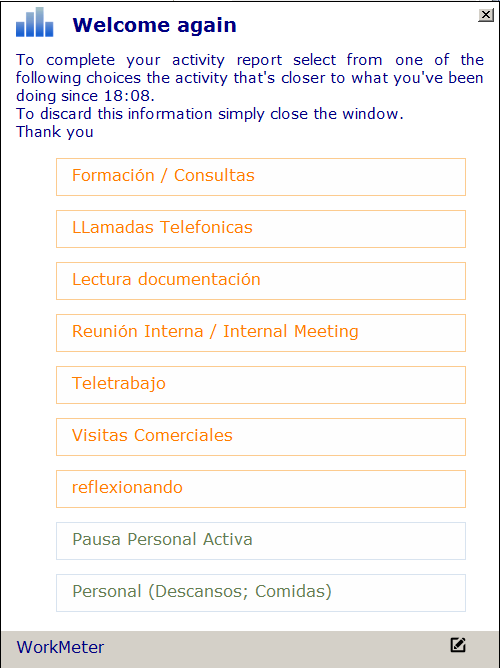
As soon as users stop interacting with the PC, the software detects that a break has started and upon returning to the device and starting activity (pressing a key or moving the mouse), a pop-up window will appear showing different customizable options indicating the reason for inactivity.
The options will be shown in orange if it is productive offline activity, and in gray if it is personal activity. If any of the productive options are selected, the time will be added to the device activity.
Activity 🔗
The “activity” is the part of active time spent on applications considered productive in the productivity map according to the job position or group.
Expected 🔗
It is the expected activity for a work group, which will be configured by the administrator or the person responsible for that group. For example, in the accounting department there may be employees who work 8 hours while others only 4, so we will create two subgroups:
- Full-time accounting with an expected 8h
- Part-time accounting with an expected 4h
Average time per activity 🔗
It is a concept that represents the concentration capacity of the employee. It shows the average time an employee has remained uninterrupted in an application without switching to another.