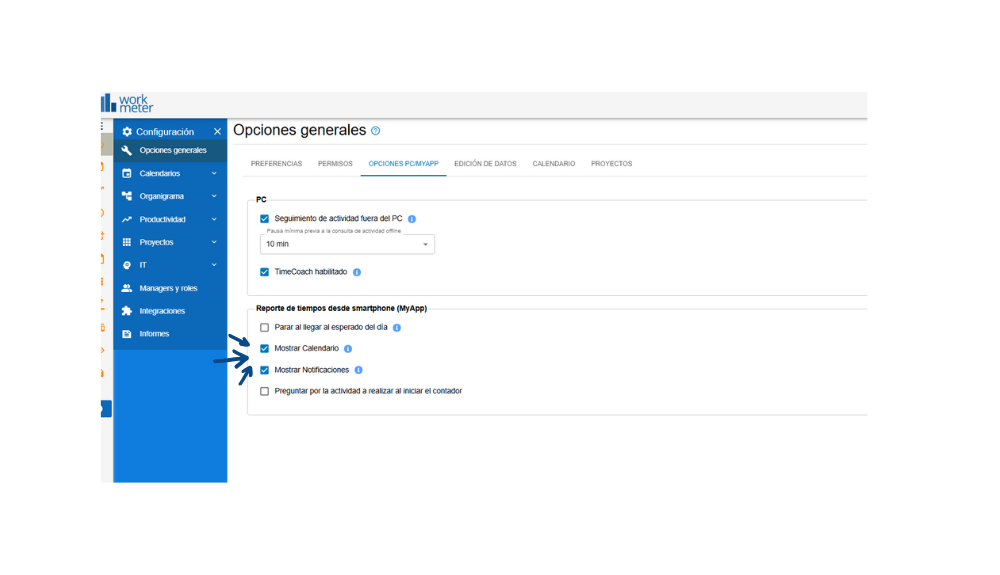
From the PC/MyApp Options tab within the General Settings panel, administrators can customize the behavior of the application for both the desktop environment and the mobile app (MyApp).
In this section, the manager or administrator can select which features to enable for users from the mobile app by checking or unchecking the corresponding checkboxes.
If all available options are enabled, the user will see the following in their application:
- Stop when reaching the expected time of the day: If activated, the user's workday will automatically stop upon reaching the expected time according to their assigned schedule.
- Show calendar: Enables the calendar view within MyApp, allowing the user to see working days, holidays, absences, or other types of shifts.
- Show notifications: Allows alerts or reminders related to activity or relevant events to be shown within the mobile app.
- Ask for activity when starting the timer: If activated, when starting the workday or a new segment, the system will ask the user about the activity or project they are going to work on.