This panel helps you monitor possible time deviations from your initial forecasts for each project and the actual data recorded so far.
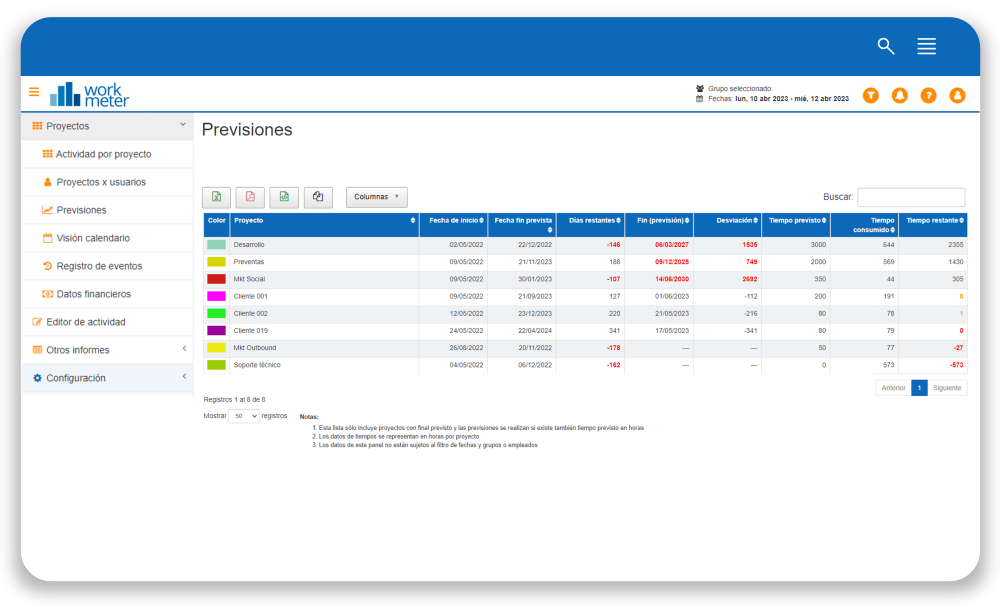
- 1. - Project : project name
- Start date : date when activity tracking begins on the project
- Planned project end date : planned project end date (this information is provided when configuring a project)
- Days remaining : number of days left until the planned project end date
- End (forecast) : project end date forecasted by the tool based on the current project trajectory and planned hours
- Deviation : shown in days and can be negative (the project will finish X days earlier than planned) or positive (the project will last X days longer than initially planned)
- Planned time : planned project duration hours (this information is provided when configuring a project)
- Time consumed : hours consumed to date on the project
- Time remaining : hours left until project completion (planned time - time consumed)
Some important clarifications about this panel:
- 1. Expired projects are shown with the figures in red when the dates have passed